function email() { // The file $type = $_GET['type']; $filename = "images/$type.jpg"; // Path to our font file $font = "arial.ttf"; $fontsize = '13'; // array of random quotes $string = $_GET['email']; $string = stripslashes($string); // get the quote and word wrap it $string = wordwrap($string,200); // create a bounding box for the text $dims = imagettfbbox($fontsize, 0, $font, $string); // make some easy to handle dimension vars from the results of imagettfbbox // since positions aren't measures in 1 to whatever, we need to // do some math to find out the actual width and height $width = $dims[4] - $dims[6]; // upper-right x minus upper-left x $height = $dims[3] - $dims[5] + 20; // lower-right y minus upper-right y // Create image $image = imagecreatetruecolor($width + 107,$height); // pick color for the background $bgcolor = "ffffff"; $bgcolor = imagecolorallocate($image, hexdec('0x' . $bgcolor{0} . $bgcolor{1}), hexdec('0x' . $bgcolor{2} . $bgcolor{3}), hexdec('0x' . $bgcolor{4} . $bgcolor{5})); // pick color for the text $fontcolor = $_GET['fontcolor']; $fontcolor = imagecolorallocate($image, hexdec('0x' . $fontcolor{0} . $fontcolor{1}), hexdec('0x' . $fontcolor{2} . $fontcolor{3}), hexdec('0x' . $fontcolor{4} . $fontcolor{5})); $overlay_gd_image = imagecreatefromjpeg("$filename"); $overlay_width = imagesx( $overlay_gd_image ); $overlay_height = imagesy( $overlay_gd_image ); // fill in the background with the background color imagefilledrectangle($image, 0, 0, $width + $overlay_width + 12, $height + 10, $bgcolor); // x,y coords for imagettftext defines the baseline of the text: the lower-left corner // so the x coord can stay as 0 but you have to add the font size to the y to simulate // top left boundary so we can write the text within the boundary of the image $x = 3; $y = $fontsize + 3; imagettftext($image, $fontsize, 0, $x + 5, $y -2, $fontcolor, $font, $string); imagecopy($image, $overlay_gd_image, $width + 11, 0, 0, 1, 95, 17); // output image to the browser $name = rand(0,100000000); imagejpeg($image,"hidden/$name.png",100); return $name; // delete the image resource imagedestroy($image); } function createimage() { $createfont = $_POST['font']; // Path to our font file $font = "fonts/$createfont"; $fontsize = $_POST['size']; // array of random quotes $string = $_POST['string']; $string = stripslashes($string); // get the quote and word wrap it $string = wordwrap($string,$_POST['width']); // create a bounding box for the text $dims = imagettfbbox($fontsize, 0, $font, $string); // make some easy to handle dimension vars from the results of imagettfbbox // since positions aren't measures in 1 to whatever, we need to // do some math to find out the actual width and height $width = $dims[4] - $dims[6]; // upper-right x minus upper-left x $height = $dims[3] - $dims[5]; // lower-right y minus upper-right y // Create image $image = imagecreatetruecolor($width,$height); // pick color for the background $bgcolor = $_POST['bgcolor']; $bgcolor = imagecolorallocate($image, hexdec('0x' . $bgcolor{0} . $bgcolor{1}), hexdec('0x' . $bgcolor{2} . $bgcolor{3}), hexdec('0x' . $bgcolor{4} . $bgcolor{5})); // pick color for the text $fontcolor = $_POST['fontcolor']; $fontcolor = imagecolorallocate($image, hexdec('0x' . $fontcolor{0} . $fontcolor{1}), hexdec('0x' . $fontcolor{2} . $fontcolor{3}), hexdec('0x' . $fontcolor{4} . $fontcolor{5})); // fill in the background with the background color imagefilledrectangle($image, 0, 0, $width, $height, $bgcolor); // x,y coords for imagettftext defines the baseline of the text: the lower-left corner // so the x coord can stay as 0 but you have to add the font size to the y to simulate // top left boundary so we can write the text within the boundary of the image $x = 0; $y = $fontsize; imagettftext($image, $fontsize, 0, $x, $y, $fontcolor, $font, $string); // output image to the browser $name = rand(0,100000000); imagepng($image, "hidden/$name.png"); return $name; // delete the image resource imagedestroy($image); } if (isset($_POST['bgcolor'])) { $image = createimage(); } if (isset($_GET['type'])) { $image = email(); } function dirList ($directory) { // create an array to hold directory list $results = array(); // create a handler for the directory $handler = opendir($directory); // keep going until all files in directory have been read while ($file = readdir($handler)) { // if $file isn't this directory or its parent, // add it to the results array if ($file != '.' && $file != '..') $results .= ""; } // tidy up: close the handler closedir($handler); // done! return $results; } ?>
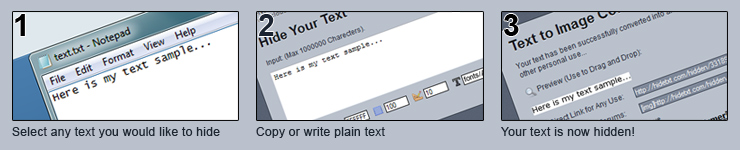
Not that I doubted we could, of course, but never the less I'm happy to report your text has now been turned into an image using our super powerful monkeys. (No honestly, we have thousands of monkeys using Photoshop to be able to do this)
Preview (Use to Drag and Drop):

Hide Text tool protects your text to be found by search engine spiders by converting text to image. Did you know every time you post text online it gets spidered and stored in various caches, including Google, Alexa Wayback machine and more. For example you selling a site on a popular forum, typing an URL in plain text format will mean the future buyer will have to live with people seeing the topic he brought the site from... less than ideal!
Or another example is if you've ever popped your email online, no doubt it's got spammed as a result, spiders cannot understand pictures as well meaning you won't get hardly as much spam! Simply put it's free to do, and could help you out more than you would know!